ExamWritePad: Why a Purpose-Built Exam Word Processor Is Worth Paying For
If you’ve ever had to set up Microsoft Word for exam access arrangements, you know the drill. Disable spell check. Disable grammar check. Turn off autocorrect. Turn off predictive text. Disable the thesaurus. Check that none of these settings have silently re-enabled themselves after an update. Now do that across every exam machine, for every session, and hope that nothing drifts between the mock run-through and the real thing.
Miss something, and you’re facing a JCQ compliance issue. Do everything correctly, and you’ve still spent an afternoon on something that shouldn’t be this difficult.
ExamWritePad exists because configuring Word for exams is a solved problem that keeps needing to be solved again. It’s a word processor built specifically for exam access arrangements, where all of those JCQ requirements are handled by design rather than by a checklist taped to a monitor in the IT office.
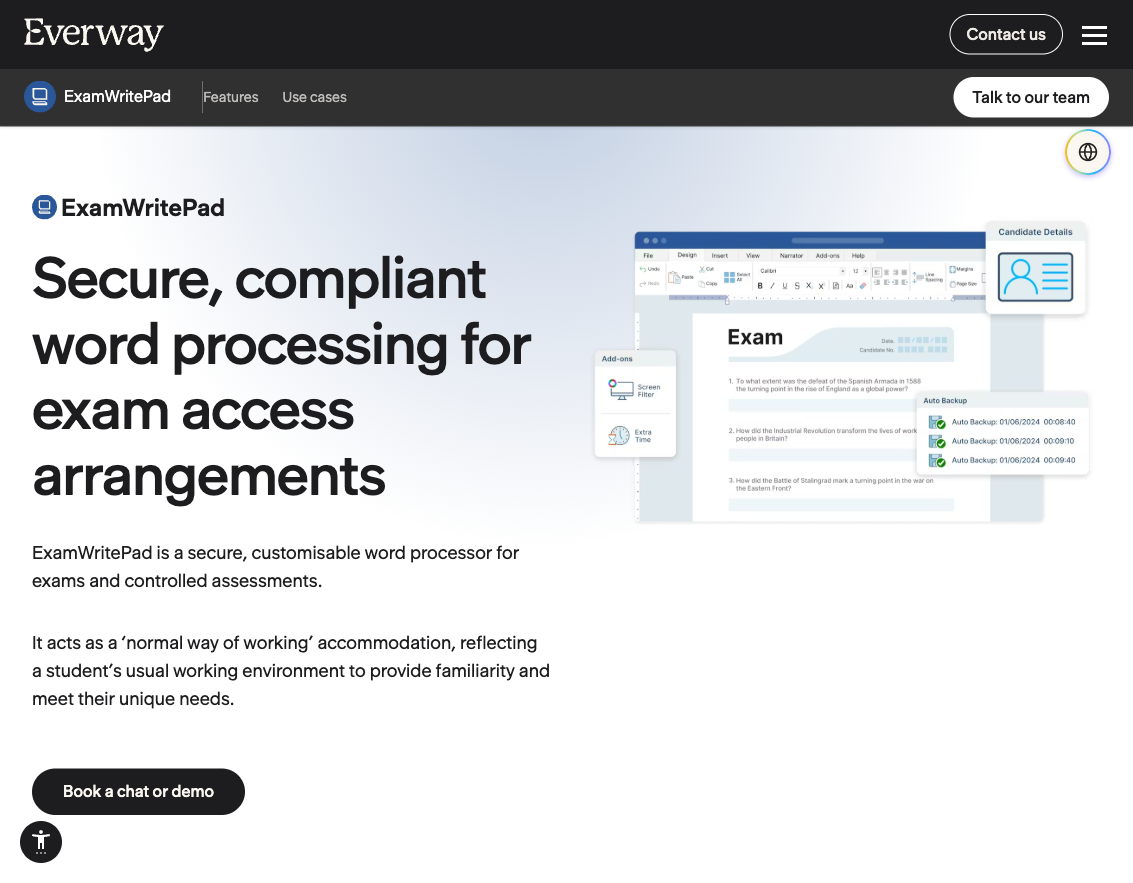
What ExamWritePad does differently from Word
ExamWritePad isn’t trying to be a general-purpose word processor. It does one thing: provide a compliant, secure typing environment for students with exam access arrangements. Students who need to type instead of handwrite in exams get a familiar word processing interface, while IT teams and exams officers get confidence that the software won’t quietly undermine JCQ, SQA, or Cambridge iGCSE requirements.
The core compliance controls are built into the defaults. Spell check, grammar check, autocorrect, and predictive text are all disabled out of the box, which is exactly what JCQ requires for a standard word processor access arrangement. Crucially, these can be selectively re-enabled per candidate for students whose individual access arrangements specifically permit them. That granularity matters when you have thirty students with different approved accommodations sitting the same paper, and it’s something that’s genuinely painful to manage through Word and Group Policy.
Features for IT teams and exams officers
The feature list runs deeper than the compliance basics. There are over 250 admin settings, configurable through a dedicated configuration tool. A few that stand out for anyone who has managed exam sessions:
Autosave and autobackup. Work is saved automatically at configurable intervals, with timestamped backups. If a machine crashes mid-exam, the student’s work can be recovered from the backup history rather than lost entirely. There’s also a dedicated work recovery process for restoring documents after crashes or unsaved closures.
Batch printing. Rather than opening and printing each candidate’s file individually, IT staff can print all candidates’ work in one operation. For a school running dozens of access arrangement candidates across a session, this saves a significant amount of time at the end of an exam.
Header, footer, and cover sheet generation. JCQ requires specific information on every submission. ExamWritePad generates compliant headers, footers, and cover sheets automatically, including candidate numbers, centre details, and exam information. No manual formatting required.
Security lockdown. The software can disable the Open and Save dialog buttons entirely, preventing students from browsing the file system or accessing anything outside the application during an exam. USB monitoring is available to track external device connections. The application runs entirely offline, with no internet connectivity required or permitted.
Candidate number management. Candidate numbers can be pre-configured and associated with individual student settings, so each candidate gets the right configuration when they sit down. BTEC learner registration numbers are supported alongside standard candidate numbers.
Screen filter overlay. Added in late 2023, this is an on-screen colour overlay for students with visual stress or dyslexia, reducing the need for separate overlay software or physical coloured sheets.
Built-in PDF reader and audio playback. ExamWritePad can load and read aloud PDF exam papers directly within the application, alongside built-in MP3 and CD player functionality. Combined with Read&Write or ClaroRead integration for text-to-speech and dictation, this means the full range of computer reader, scribe, and word processor access arrangements can be handled from a single application.
Accented character and symbol support. Essential for modern foreign language exams, students can insert accented characters and symbols without needing to memorise Alt codes or rely on Word’s insert symbol dialog.
Deployment support. The software supports Microsoft Intune deployment via AUMID, alongside traditional MSI installation, so it fits into modern school device management workflows. Licence pricing covers unlimited devices and users within the school, so there’s no per-seat counting to manage.
The shift from free to paid
ExamWritePad was free for about eight years. It started as a solo development project, and the developer maintained it without charge while it built a following among exams officers and school IT teams. That changed in July 2023, when ExamWritePad moved to a paid model.
The developer was transparent about the reasoning: “Having spent many years on this project, eight years to be exact, it has now come to the point where I need to secure the long term future for the project.” The revenue was needed to fund third-party component licensing, expand staffing, develop support for additional operating systems, and build new features. A single developer maintaining critical software for free was a fragile arrangement, and the move to paid licensing was about sustainability, not cashing in.
ExamWritePad is now distributed by Everway (the company formerly known as Texthelp’s education division). Everway lists pricing from £625 per year for schools and from £1,200 for further and higher education, based on student enrolment numbers. The ExamWritePad direct shop still shows a 1-year licence at £499. The original launch pricing when it first went paid was £249/year or £675 for three years, so prices have increased noticeably. Each licence includes a year of software updates, email and web support, unlimited device and user access across the school, and early-release beta access to new features. Multi-Academy Trusts can negotiate bulk discounts. If you’re budgeting, check both the direct shop and Everway channels, and ask about bundle pricing with Read&Write or ClaroRead.
The case for paying: time, risk, and confidence
The cost question is really about what you’re comparing it to. Word is “free” in the sense that most schools already have Microsoft 365 licences. But the time cost of configuring Word for exam compliance is not free, and neither is the risk.
Every exam session, someone in the IT team has to verify that each machine is correctly configured. Group Policy can handle some of this, but Word’s settings are spread across multiple locations, and Microsoft has a habit of moving or renaming them between versions. Registry tweaks that worked last year might not work after a feature update. If a student’s machine has spell check enabled during an exam because a setting reverted, that’s a compliance problem that falls on the school.
ExamWritePad removes that entire category of worry. The software is compliant out of the box. Configuration is centralised. The exam officer sets it up once, and it stays set up. For a school running hundreds of access arrangement sessions across the exam season, that time saving and risk reduction adds up to more than £499.
A survey of over 2,000 exams officers at the National Association of Exams Officers Conference found ExamWritePad was the most popular word processor for access arrangements, used by 18.3% of respondents. That’s a meaningful share for a specialist tool in a space where Word is the default.
Honest caveats
ExamWritePad is Windows only. If your exam machines are Macs or Chromebooks, this isn’t an option. For most UK schools running Windows in their exam halls, that’s fine, but it’s worth confirming before you budget for it.
The pricing has moved noticeably since the initial paid launch. Going from free to £249/year was one thing; going from £249 to £499 (or £625 through Everway) in under three years is a steeper trajectory. Schools that adopted early at the lower price will have noticed. Whether the current price represents fair value depends on how many access arrangement candidates you have and how much IT time you’re currently spending on Word configuration.
It’s also another annual licence to manage. Schools already juggle dozens of software subscriptions, and adding one more to the renewal calendar is a legitimate operational consideration, even if the cost itself is justified.
Finally, the transition to Everway distribution means the product’s roadmap is now tied to a larger company’s priorities. That could be a positive (more resources, better support) or a concern (less agility, potential bundling pressure). So far, the product seems to have kept its focus, but it’s worth watching.
A measured recommendation
For any school running a significant number of exam access arrangements on Windows machines, ExamWritePad is worth the cost. The time saved over configuring Word, the compliance confidence, and the reduction in exam-day risk are tangible benefits that justify the licence fee.
If you only have a handful of access arrangement candidates and your IT team has a reliable Word configuration process already in place, the case is less clear-cut. But if you’ve ever had that moment of anxiety before an exam session, wondering whether every machine is correctly set up, ExamWritePad is the tool that makes that feeling go away.